A commercial contractor was losing subcontractor invoices, missing lien waiver deadlines, and drowning in change orders. We built the system that made it stop.
This 85-person general contractor in Schaumburg runs 12 to 18 active projects at any time. Each project generates a constant stream of sub invoices, lien waivers, change orders, and submittals. 120+ documents a day with no centralized intake. We built an Azure Logic Apps pipeline that classifies, extracts, routes, and files every document automatically. Human reviewers only see the 6% that actually need judgment.
The Problem
They weren't just losing time on documents. They were losing documents.
This general contractor runs 12 to 18 commercial projects at a time, each with 8 to 15 subs. Every sub sends invoices, waivers, change orders, submittals, and insurance certs. Documents arrive by email, fax, and text. One sub was texting invoice photos to the superintendent's personal phone. PMs were supposed to forward everything to the office, but they're on job sites all day and forwarding always slipped. One office admin tried to keep up: classify each document, match it to a project, key invoice data into Sage 300, file everything in SharePoint, and track waiver compliance on a spreadsheet that was out of date by the time she updated it. 120+ documents a day across 15 projects. She was always 2 to 3 days behind. The real damage showed up at billing time. They bill on AIA G702/G703 format. Missing a lien waiver means the owner holds 150% of that sub's line from the draw. On a $3M project, one missing waiver can hold up $40K to $60K. It happened three times in six months. Roughly $180K in delayed draws because waivers got misfiled or lost in somebody's inbox.
What we found
- !120+ documents per day across 15 active projects with no centralized intake
- !One office admin trying to classify, enter, file, and track everything manually, always 2 to 3 days behind
- !$180K in delayed owner draws over six months from missing lien waivers that were received but misfiled
- !PMs spending 45+ minutes a day searching SharePoint for documents that hadn't been filed yet
- !Waiver compliance tracked in a spreadsheet nobody trusted, with problems surfacing only at pay app time
The Solution
Every document gets classified, extracted, filed, and tracked. The system doesn't forget waivers.
We built on Azure because they were already a Microsoft shop. Office 365, SharePoint, Teams, Sage 300. Logic Apps Standard handles orchestration. Document Intelligence handles extraction. Three intake points: Outlook triggers on the AP inbox and all PM inboxes, a SharePoint 'Drop Zone' library for scans and uploads, and webhook endpoints for the two subs who submit electronically. Every document hits the same classification step. A custom neural model trained on 180 of their actual documents sorts into six types: sub invoice, lien waiver, change order, submittal, insurance cert, and inspection report. The right classification triggers the right extraction template. After extraction, documents route two ways: everything gets filed in the correct SharePoint project folder with standardized naming, and financial documents post to Sage 300 through a middleware function we built. The waiver tracking was the piece they cared about most. When a sub invoice posts, the system checks if the corresponding waiver exists. If not, it starts a countdown. PM notification at Day 7, controller escalation at Day 14, automatic payment hold at Day 21. That timer runs on a durable function that survives restarts and maintenance windows. Replaced the spreadsheet entirely. Documents where the model isn't confident route to a Teams Adaptive Card. The reviewer sees the scan, the extracted data, and the problem fields highlighted. They confirm or correct without leaving Teams.
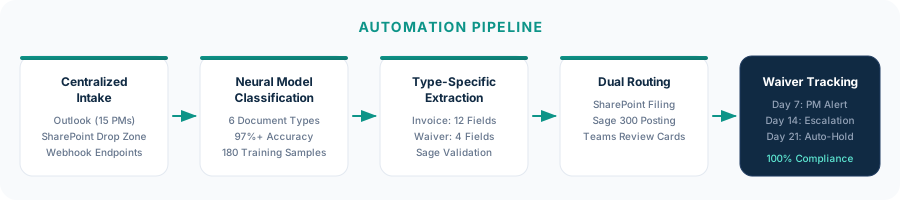
Centralized intake across email, SharePoint, and webhook
Outlook triggers on AP and all 15 PM inboxes. SharePoint watcher on the Drop Zone library. Webhook endpoints for electronic submissions. Everything enters the same pipeline within 90 seconds of arrival.
Custom neural model classification
Trained on 180 labeled samples across 6 document types. Above 97% classification accuracy. Includes a 'not-a-project-document' class that filters out meeting invites, signature pages, and marketing attachments automatically.
Type-specific extraction and validation
Sub invoices extract 12 fields including cost code and retention. Waivers extract contractor name, through-date, amount, and type (conditional vs. unconditional). All extracted data validates against project master data in Sage. Bad cost codes, wrong project numbers, and out-of-range amounts get flagged immediately.
Dual routing: SharePoint filing and Sage posting
Every document files to the right SharePoint project folder using a standardized naming pattern. Financial documents also post to Sage 300 AP through a middleware function that handles field mapping, retention math, and duplicate detection. If Sage rejects the posting, the document goes to the exception queue. It doesn't disappear.
Automated lien waiver compliance
Sub invoice posts without a matching waiver? Day 7 PM notification. Day 14 controller escalation. Day 21 automatic payment hold in Sage. Runs on a durable timer. The controller gets a live dashboard showing waiver status across every active project.
Implementation
4 weeks from kickoff to processing live documents
Construction document automation is harder than manufacturing AP. Wider document variety, more complex routing, higher stakes on the waiver tracking. We spent the first week on discovery because we needed to understand the pay app process, the waiver compliance requirements, and the Sage data model. PMs weren't going to change how they work, so we designed around them. They don't forward anything anymore. The system monitors their inboxes directly.
On-site discovery at the office and two active job sites. Shadowed the admin, two PMs, and the controller. Collected 180 sample documents. Mapped the Sage workflow and SharePoint folder structure.
Trained the Document Intelligence custom neural model. Deployed Logic Apps intake workflows for email, SharePoint, and webhook triggers.
Sage 300 middleware function covering field mapping, cost code validation, retention handling, and duplicate detection. SharePoint auto-filing. Waiver tracking with durable timers and escalation logic. Teams Adaptive Cards for the review flow.
Parallel processing. Found two edge cases: one sub puts multiple projects on a single invoice (we split it), another sub's 'invoices' are actually payment applications with a completely different field layout. Fixed both, trained staff on the exception flow, and went live.
The Impact
Zero missed waivers. Zero held payments. Books close two days faster.
First 60 days: about 5,800 documents across 14 active projects. Roughly 94% classified, extracted, filed, and posted without anyone touching them. The exceptions were real: new subs not yet in the system, change orders requiring PM sign-off, insurance certs that needed manual coverage verification. Those should involve a person. Waiver tracking eliminated the core problem entirely. First two billing cycles after go-live showed 100% waiver compliance and zero held payments. The controller estimated roughly $60K would have been held under the old process during that same period. After six weeks we made two adjustments. We added a Saturday batch job that generates a weekly compliance report per project covering waiver status, outstanding invoices, pending change orders, and insurance expirations. It lands in each PM's inbox at 6 AM Monday. We also retrained the classification model after onboarding a drywall sub whose invoices included embedded photos of completed work. The model kept classifying them as submittals. Forty new training samples fixed it.
“Good experience overall. They understood construction, which helped. The waiver tracking alone was worth it. We haven't had a held payment since it went live and my PMs actually trust the filing system now.”
Same problem? Let's talk.
30 minutes. We'll look at your document workflow and tell you exactly where automation fits — and where it doesn't.