A 45-person manufacturer had three people touching every invoice. We built a system where the invoices process themselves.
This plastics manufacturer in Addison processes 200+ supplier invoices a week across 70+ vendors. Three AP clerks spent their entire week on data entry. We deployed a self-hosted n8n workflow with an XGBoost classifier, Azure Document Intelligence, and confidence-based routing that cut AP labor from 30 hours a week to under 3.
The Problem
Three people. Two hundred invoices a week. Nobody could fix the bottleneck.
This plastics manufacturer runs 14 injection molding presses and buys from 70+ vendors. Resin distributors, tooling shops, freight carriers, secondary ops. That adds up to 200+ invoices a week hitting an AP inbox as PDFs, scans, and the occasional phone photo. Three clerks split the work by vendor type. Each one opened the invoice, found the PO in the ERP, keyed in every line item, checked quantities against receiving, verified pricing, and routed anything over $5K to the plant manager. A simple invoice took 8 minutes. A multi-page resin order took 30. The plant manager approved from email, which he checked after 5 PM because he spent his days on the production floor. By Friday, 30 to 40 invoices were always stuck waiting. Vendors called about late payments. Two suppliers put them on credit hold in the past year. One of those holds happened during a production run that needed that resin. The controller spent her Fridays calling vendors to apologize instead of closing books.
What we found
- !200+ invoices per week across 70+ vendors, each taking 8 to 20 minutes of manual entry and PO matching
- !Three AP clerks spending their entire week on data entry with no bandwidth for anything else
- !Plant manager approval bottleneck: invoices over $5K sat 2 to 3 days because he was on the floor all day
- !Two supplier credit holds in the past year that actually delayed production runs
- !Month-end close taking 4 days instead of 2 because AP was always behind
The Solution
The invoices process themselves. People handle the exceptions.
We deployed a self-hosted n8n cluster on their existing Docker infrastructure. Invoices arrive three ways: email (IMAP monitor on the AP inbox), scanned documents (watched network folder), and phone uploads (webhook). Everything hits the same pipeline. First, an XGBoost classifier trained on their actual invoice history sorts each document into one of six categories in under 200ms. Then Azure Document Intelligence extracts the fields. Prebuilt model for standard invoices, custom model for the five vendors with non-standard formats. One of those vendors sends invoices that look like they were designed in WordPerfect. Extracted data validates against open POs through the ERP's API. Vendor, quantities, and pricing all match within tolerance? Posts automatically. Doesn't match? The exception goes to a reviewer with the exact discrepancy flagged. Something like: 'Line 3, invoice says 12,000 lbs, PO says 10,000 lbs.' Manager approvals moved from email to Slack cards. Phone tap, done.
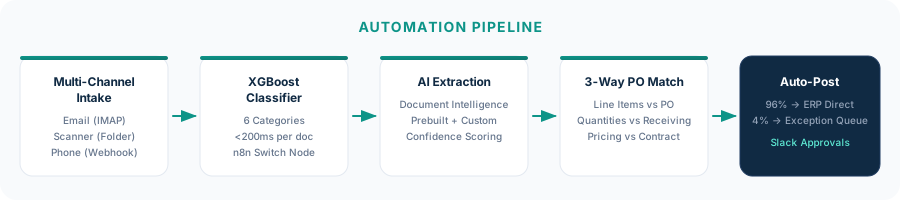
Multi-channel intake
IMAP trigger on the AP inbox, folder watcher on the scan share, webhook for phone uploads. All three normalize into the same pipeline. Downstream processing doesn't care how the invoice arrived.
XGBoost classification and routing
Trained on 2,400 real invoices from their vendor history. Six classes including a 'not-an-invoice' catch-all for statements, remittance advices, and marketing PDFs. Runs in under 200ms. The n8n Switch node routes each class to its extraction branch.
AI extraction with Document Intelligence
Prebuilt invoice model for standard formats. Custom neural model for the five vendors with non-standard layouts. Confidence scores follow each field through the entire pipeline.
Three-way PO matching
Invoice line items vs. PO line items. Receiving quantities vs. invoiced quantities. Contracted pricing vs. invoiced pricing. Tolerances are configurable per vendor because some vendors round and others don't. Clean match means auto-post. Discrepancy means exception queue with the specific problem flagged.
Confidence-based human routing
Any field below 0.85 confidence sends the invoice to a review queue regardless of PO match status. Low-confidence fields are highlighted in the review interface. Corrections feed back into the training data. Invoices over $5K get a Slack card pushed to the plant manager with approve and reject buttons.
Implementation
4 weeks from kickoff to live processing
We spent two days on-site watching how invoices actually moved through the building. Not the process they described in the kickoff meeting, but the process that actually happened. We collected 2,400 historical invoices for classifier training and mapped every vendor's format quirks. One puts the PO number in the ship-to field. Another combines three POs on a single invoice. Built the system in about two weeks. Ran in parallel for the last week and a half. The first live invoice processed on its own at the start of week four.
On-site discovery. Shadowed all three AP clerks. Collected 2,400 invoices from the last 18 months. Documented 14 vendor-specific format quirks.
Labeled training data and trained the XGBoost classifier. Deployed n8n on Docker with PostgreSQL. Built intake workflows for all three channels.
Document Intelligence setup with prebuilt and custom models for the five non-standard vendors. PO matching against the ERP API. Exception routing logic. Slack approval flow.
Parallel processing: AI and manual side by side. Found 3 edge cases (multi-currency invoices, credit memos applied against POs, and the vendor with PO numbers in the ship-to field). Fixed all three and went live.
The Impact
Two hundred invoices a week. Three hours of human time. Zero late payments.
First full month: 847 invoices processed, 816 posted with zero human touch. The 31 exceptions were real discrepancies. Quantity mismatches, pricing disputes, things that needed vendor follow-up no matter how you process the invoice. The three clerks moved to roles that had been understaffed: procurement, customer service, and system administration for the automation itself. We did make one post-deployment adjustment worth noting. The original 0.90 confidence threshold was too aggressive. It was routing about 8% of clean invoices to review because their older Fujitsu scanner produced slightly tilted scans. We dropped the threshold to 0.85 for fields with consistent patterns and the straight-through rate jumped from 91% to over 96% with no increase in errors.
“Honestly I was skeptical at first. But Mike came in, watched how we worked, and built something that actually fits. My AP staff went from buried in invoices to handling exceptions only. It just runs.”
Same problem? Let's talk.
30 minutes. We'll look at your document workflow and tell you exactly where automation fits — and where it doesn't.